
The Pre-Truncation Hook Formula: Prompting AI for the First 150 Characters
A prompting framework for writing the visible preview lines before the more button, with formulas for open loops, contrarian hooks, and curiosity gaps.
A prompting framework for writing the visible preview lines before the more button, with formulas for open loops, contrarian hooks, and curiosity gaps.
Scroll speed on Instagram and LinkedIn is measured in milliseconds, and the platform only gives your caption one shot to earn a tap on "... more" before it gets swallowed by the feed. That shot is roughly 125 characters on Instagram and about 210 on desktop LinkedIn.
Everything after that point is invisible until someone decides your opening was worth the extra second. This is the part of the caption that actually does the selling, and it's also the part most people forget to prompt for separately.
Typical AI captioning prompts ask a model to write a "full caption about X" and hope the first sentence happens to be strong. That's backwards. The opening line isn't a byproduct of a good caption, it's a distinct creative task with its own rules, its own failure modes, and its own prompt structure.
This guide breaks down how to prompt AI models specifically for the pre-truncation zone, the visible preview text that decides whether anyone ever reads sentence two.
Feed algorithms and human attention work together against your caption. The algorithm decides whether to show your post at all, and the human decides whether to expand it. Both decisions happen before your actual message gets read. If the preview line is generic, an anecdote intro like "So this happened to me today" or an all-caps announcement, most readers scroll past without ever engaging with the substance of the post.
Think of the truncation point as a mini landing page. A landing page headline has one job: get the visitor to keep reading. It doesn't need to explain the whole offer, it needs to create enough tension, curiosity, or disagreement that stopping feels harder than continuing. The pre-truncation hook works exactly the same way, except it has a hard character limit enforced by the platform itself.
Character limits vary by device, font size, and whether the post includes a location tag or collaborator tag, which eats into the visible space. Treat the numbers in this guide as safe targets, not exact cutoffs.
The practical consequence is that your AI prompt needs to separate two jobs that usually get merged into one request: writing the hook, and writing the caption. When you ask for both at once, most models default to a topic sentence that sets up the caption logically but doesn't create any tension on its own. A logical topic sentence and a scroll-stopping hook are not the same thing, and prompting for them requires different instructions.
A hook that survives truncation shares a few structural traits regardless of which platform it lives on.
First, it withholds something. The reader has to tap "more" to get the payoff, the explanation, or the resolution. If the hook already gives away the point, there's no reason to keep reading.
Second, it's self-contained enough to make sense on its own, even out of context. Someone scrolling past has zero background on your post. A hook that only makes sense after reading the whole caption fails at the preview stage.
Third, it uses specific, concrete language rather than vague setup phrases. "Here's something I learned" tells the reader nothing. "I lost $4,000 because I skipped one step" tells them exactly what's at stake.
Read only the first line of your last ten posts out loud, without reading anything after it. If you can't guess what the post is about or why you'd care, the hook needs work regardless of how good the rest of the caption is.
Different platforms cut off preview text at different points, and some also change behavior based on whether the post is a feed post, a carousel, or a reel caption. Prompting for the wrong character count means your hook either gets cut off mid-sentence or leaves visible space unused.
| Platform | Approx. Visible Characters | Notes |
|---|---|---|
| Instagram (feed post) | 125 | Cuts off around 2-3 lines on mobile |
| Instagram (reels) | 55 | Shorter due to overlay UI elements |
| ~140 (mobile), ~210 (desktop) | Shows roughly 3 lines before "... see more" | |
| 120-150 | Similar to Instagram but device-dependent | |
| TikTok | 80-100 | Caption competes with on-screen sound and hashtag UI |
| X (formerly Twitter) | 280 total | No true truncation, but first line still matters for retweets |
These figures shift over time as platforms redesign their UI, so treat them as a starting range and verify against your own account's rendering before finalizing a campaign.
Once you know the target platform, the prompt should explicitly state the character ceiling for the hook, not the caption. A model that isn't told the difference will often optimize the whole message to fit under the limit instead of front-loading the tension into the first sentence.
There isn't one universal hook style. Different formulas suit different content types, and a strong prompt should let you specify which mechanism you want the AI to use rather than leaving it to guess.
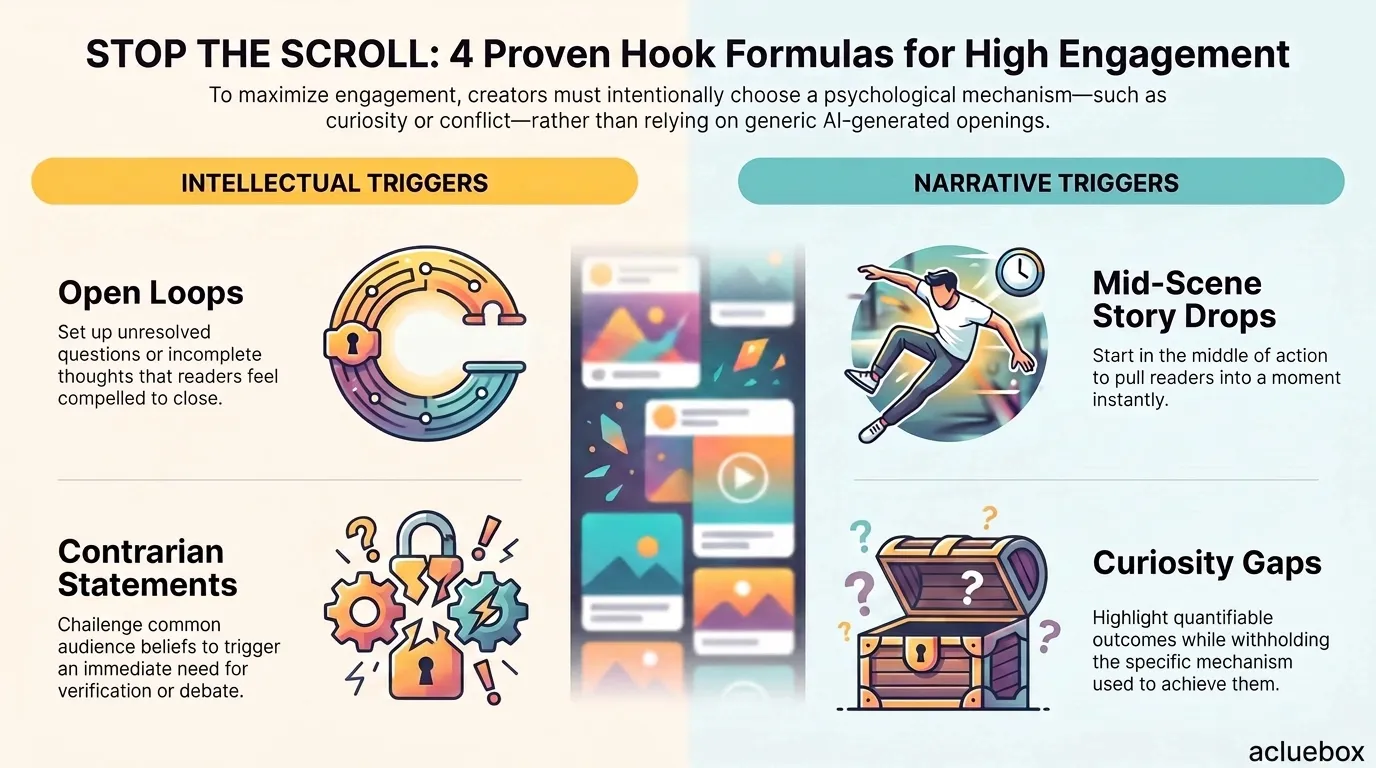
Open loops set up an unresolved question or incomplete thought. "The one edit that doubled my engagement (it's not what you think)" creates a gap the reader wants closed.
Contrarian statements challenge a common belief the audience already holds. "Posting daily is actually hurting your reach" works because it contradicts conventional advice, which triggers a need to verify or argue.
Mid-scene story drops open in the middle of an action instead of at the beginning of a narrative. "The client hung up on me twice before this deal closed" pulls the reader into a moment rather than a chronological setup.
Curiosity gaps hint at a specific, quantifiable outcome without explaining how it happened. "This 3-word email got me a reply from a Fortune 500 CEO" works because the number and outcome are concrete, but the mechanism is missing.
Rotate formulas across a content calendar instead of relying on one style. Audiences pattern-match quickly, and a contrarian hook loses power once every post starts with a challenge to conventional wisdom.
The core shift in this approach is asking the model for hook variations as a standalone deliverable, separate from the caption body. This forces the model to spend its full creative effort on one or two sentences instead of splitting attention across an entire post.
A strong prompt for this task includes five elements: the platform (to set the character ceiling), the topic or story the post is about, the hook formula you want tested, the tone of voice, and a request for multiple variations so you can compare options rather than accepting the first output.
Write {{number_of_variations}} opening hook lines for a {{platform}} caption about {{topic_or_story}}.

Constraints:
- Maximum {{character_limit}} characters per hook, since this is the visible preview text before the "more" button
- Use the {{hook_formula}} technique (open loop, contrarian statement, mid-scene story drop, or curiosity gap)
- Tone should be {{tone}}
- Each hook must make sense as a standalone sentence, with no assumed context from the rest of the caption
- Do not resolve or explain the hook, it should create tension that only the full caption answers
- Avoid generic openers like "Here's the thing" or "So this happened"

Audience: {{target_audience}}
Key detail or number to anchor the hook (if any): {{specific_detail}}

Output each hook on its own line, numbered, with the character count listed next to it.
Here's the same template filled in for a real scenario, a freelance copywriter posting on Instagram about losing a client and what it taught them.
Write 5 opening hook lines for an Instagram caption about losing my biggest client after a pricing mistake.

Constraints:
- Maximum 150 characters per hook, since this is the visible preview text before the "more" button
- Use the mid-scene story drop technique
- Tone should be honest and slightly vulnerable, not overly polished
- Each hook must make sense as a standalone sentence, with no assumed context from the rest of the caption
- Do not resolve or explain the hook, it should create tension that only the full caption answers
- Avoid generic openers like "Here's the thing" or "So this happened"

Audience: freelance copywriters and consultants who undercharge
Key detail or number to anchor the hook (if any): I lost a $6,000/month client over a $200 invoice dispute

Output each hook on its own line, numbered, with the character count listed next to it.
Running this prompt against a capable model typically returns something like: "He fired me over $200. I didn't even flinch when I sent the email that ended it." Notice that neither sentence explains the backstory, both are readable on their own, and both stay under the character ceiling.
Character counts reported by language models are frequently off by a few characters in either direction. Always verify the actual count with a character counter before publishing, especially when you're close to the platform's cutoff.
The most frequent failure is asking for the hook and caption in a single prompt. When a model writes both at once, it tends to treat the opening line as a topic sentence rather than a standalone attention grabber, because its attention is split across the full structure of the post.
The second common mistake is omitting the character limit entirely. Without a stated ceiling, models often produce hooks in the 180 to 220 character range for Instagram, which get cut off at an awkward point mid-clause rather than at a natural pause.
The third mistake is asking for a hook without specifying which formula to use. A vague instruction like "make it catchy" tends to produce safe, generic openers because the model has no specific mechanism to reach for. Naming the formula, open loop, contrarian, mid-scene, or curiosity gap, gives the model a concrete technique instead of an abstract goal.
If a batch of hooks feels flat, try changing only the formula while keeping the topic and detail identical. Comparing the same story across four formulas usually reveals which mechanism fits that particular content best.
Small and isolated, hooks are easy to test. Share the same body copy with two distinct opening lines across separate posts, or run Stories polls to see which opening grabs your audience first.
Measure engagement within the first hour because feed algorithms rely heavily on initial traction to boost distribution. Strong early performance proves your hook worked at the truncation mark.
Maintain a log of winning formulas by format, such as curiosity gaps for announcements or contrarian statements for lessons. Feeding these winners back into your AI prompts turns hook creation into a compounding system.
What's the difference between a hook and a caption's first sentence?
A hook is written specifically to work as standalone preview text before the "more" button, while a first sentence is often just the logical start of the full caption. A hook withholds information on purpose, a plain first sentence usually doesn't.
Should I always use the maximum character limit for the platform?
Not necessarily. A shorter, punchier hook that stops well before the limit can outperform one that fills the entire space, especially on Instagram where line breaks affect readability. Test both lengths rather than defaulting to the maximum.
Can the same hook formula work across every platform?
The four formulas translate across platforms, but the pacing changes. LinkedIn's longer preview window allows for slightly more setup before the tension point, while TikTok's short window rewards formulas that create tension in the first few words.
How many hook variations should I generate before choosing one?
Five to eight variations per post gives enough range to compare formulas and tones without spending excessive time reviewing options. Fewer than three tends to limit you to whatever the model defaults to first.
Does the hook formula matter if the rest of the caption is weak?
A strong hook only earns the tap, it doesn't guarantee retention once someone expands the post. The caption body still needs to deliver on the tension the hook created, or engagement drops off after the initial click.

Stop Claude From Guessing: Prompting Tips for Accurate Answers

The Ultimate Brand Voice Prompt Template for Social Media Copywriting
The 6-Element Voice Profile: Why AI Can't Protect a Voice You Never Documented

Strategic Content Pillar & Theme Formulation: A Framework Before You Prompt

Generating Usable, Vector-Ready Logo Marks with AI