
CO-STAR Prompt Framework: Template, Filled Examples, When to Skip It
Context, Objective, Style, Tone, Audience, Response — the six-field brief with a copy-paste template and a brand email fully written out.
Context, Objective, Style, Tone, Audience, Response — the six-field brief with a copy-paste template and a brand email fully written out.
Most people type a question into ChatGPT, Claude, or Gemini, get a mediocre answer, and shrug it off as "the AI just isn't that smart." But nine times out of ten, the problem isn't the model. It's the prompt. A vague input produces a vague output, no matter how powerful the model behind it is. That's where the CO-STAR framework comes in, and once you see how it works, you'll wonder how you ever prompted without it.
CO-STAR is a six-part structure for building prompts that leave nothing to guesswork. It gained widespread attention after winning Singapore's GPT-4 prompt competition, and it has since become one of the most widely taught prompting methods among marketers, product managers, developers, and everyday AI users. In this guide, we'll break down each component, show you how to combine them into a reusable template, and walk through real examples you can copy and adapt today.
CO-STAR is an acronym that stands for Context, Objective, Style, Tone, Audience, and Response. Each letter represents a distinct piece of information the model needs before it can generate a genuinely useful answer. Instead of throwing a single sentence at an AI model and hoping for the best, CO-STAR asks you to fill in six labeled sections, similar to filling out a form. The result is a prompt that removes ambiguity and gives the model a clear map of what you actually want.
The framework was popularized by Sheila Teo and later documented in prompt engineering resources used by Singapore's GovTech agency. GovTech's own team explains that the CO-STAR framework helps AI understand the scenario, focus on the task, match the right writing style, set the emotional tone, tailor content to the audience, and structure the output correctly.
Here's what each letter means in practice:
| Letter | Component | What It Does |
|---|---|---|
| C | Context | Gives background information so the model understands the situation |
| O | Objective | States the specific task or goal you want accomplished |
| S | Style | Defines the writing style, such as journalistic, academic, or conversational |
| T | Tone | Sets the emotional register, like formal, friendly, or persuasive |
| A | Audience | Identifies who the response is for, shaping vocabulary and complexity |
| R | Response | Specifies the output format, such as a table, bullet list, or email |
Some versions of this framework stop at five components (Context, Objective, Style, Tone, Audience) and treat Response as an optional add-on. The six-part version is more widely used today because it removes formatting guesswork entirely.
Large language models predict the next most likely word based on everything you've given them. When your prompt is thin, the model has to fill in the gaps with its own assumptions, and those assumptions rarely match what you had in mind. CO-STAR eliminates that guessing game by feeding the model rich, structured information up front.
Prompt engineering has become a genuine professional skill rather than a novelty. According to CNBC, jobs requiring generative AI skills carry an average salary potential of over $174,000 a year, and prompt engineering specifically is described as a "gateway skill" that opens doors across industries. That demand exists precisely because structured prompting produces measurably better, more consistent results than ad hoc requests.
On the enterprise side, the stakes are even higher. A Forbes Technology Council contributor notes that prompt engineering functions as strategic infrastructure beneath AI agents, retrieval-augmented generation systems, and other production-grade tools, not just a nice-to-have trick for casual chat sessions. When a business builds workflows around AI, sloppy prompting doesn't just produce a bad paragraph. It produces unreliable systems.
CO-STAR matters because it turns prompting from an art into a repeatable process. You're not relying on inspiration each time you open a chat window. You're filling in a checklist that consistently produces sharper output.
Save your CO-STAR prompts as templates. Once you've built a solid Context and Objective for a recurring task, like writing weekly reports or drafting customer emails, you can reuse the same skeleton and just swap out the details.
Context is the background information that helps the model understand the situation surrounding your request. This might include who you are, what project you're working on, what's happened so far, or any constraints that matter. Skipping context is the single biggest reason AI responses feel generic. The model doesn't know your industry, your audience's pain points, or your company's voice unless you tell it.
A good rule of thumb: imagine you're briefing a new freelancer who has zero prior knowledge of your business. What would they need to know before starting the task? That's your Context section.
The Objective is the single, clear task you want the model to complete. Vague objectives like "help me with marketing" produce vague results. Specific objectives like "write three subject lines for a re-engagement email targeting lapsed subscribers" produce usable output on the first try.
Keep this section to one primary goal. If you have multiple objectives, either run them as separate prompts or clearly rank them so the model knows which one takes priority.
Style refers to the writing conventions you want the model to follow. Should the output read like a news article, a casual blog post, a legal memo, or a witty social media caption? You can also reference a well-known writing style, such as "write like a tech journalist" or "structure this like a McKinsey slide deck," to give the model a familiar frame of reference.
Tone is the emotional attitude behind the words. Style and Tone are often confused, but they're not the same thing. Style is about structure and convention; Tone is about feeling. A prompt could specify a journalistic Style with an urgent Tone, or a conversational Style with a reassuring Tone. Getting this pairing right is often what separates a stiff AI response from one that actually sounds human.
Audience defines who will read or use the output. A response written for software engineers should look completely different from one written for first-time app users. Specifying the audience adjusts vocabulary, technical depth, and even the examples the model chooses to use.
Response format tells the model exactly how to package the answer. Do you want a table, a numbered list, a short paragraph, JSON output, or an email with a subject line? This section prevents the frustrating back-and-forth of asking the model to reformat its answer after the fact.
When you need output that plugs directly into another tool or workflow, like a spreadsheet or a script, be explicit about the Response format. Saying "return this as a markdown table with three columns" is far more reliable than saying "make it easy to read."
CO-STAR isn't the only structured prompting method out there. Depending on your task, other frameworks might fit better. Here's how CO-STAR compares to other common alternatives.
| Framework | Best For | Components | Complexity |
|---|---|---|---|
| CO-STAR | Content writing, creative tasks, audience-specific communication | Context, Objective, Style, Tone, Audience, Response | Moderate |
| RTF | Quick tasks, single-turn requests, straightforward formatting | Role, Task, Format | Low |
| CRAFT | Public-facing content, tone-controlled communication | Context, Role, Action, Format, Tone | Moderate |
| RISEN | Task automation, workflow prompts | Role, Instructions, Steps, End goal, Narrowing | Moderate |
| TIDD-EC | Precision tasks requiring exact output rules | Task, Instructions, Do's, Don'ts, Examples, Context | High |
CO-STAR tends to shine when the output needs to resonate with a specific human reader, such as marketing copy, reports, or client-facing emails. TIDD-EC, by contrast, is built for situations where precision and rule enforcement matter more than tone, like generating structured data or following strict formatting rules. Choose the framework that matches the nature of your task rather than defaulting to one for everything.
Building a CO-STAR prompt is straightforward once you have the template in front of you. Write each section as a labeled block, keep your Objective singular and specific, and don't skip Response even if it feels obvious. Below is a reusable template you can adapt for almost any writing task.
Context: {{background_information}}

Objective: {{specific_task_goal}}

Style: {{writing_style_reference}}

Tone: {{emotional_register}}

Audience: {{target_reader}}

Response: {{output_format}}
Here's the same template filled in for a real marketing scenario, showing how the placeholders become concrete instructions.
Context: We run a small subscription coffee company called Roast & Route. We just launched a new single-origin Ethiopian blend and want to announce it to our existing email list of 8,000 subscribers who already buy coffee from us monthly.

Objective: Write a promotional email announcing the new Ethiopian blend and encouraging subscribers to add it to their next order.

Style: Write like a friendly small-business newsletter, similar to how independent coffee brands write on Instagram.

Tone: Warm, enthusiastic, and slightly informal, but not overly salesy.

Audience: Existing subscribers who already trust our brand and know basic coffee terminology like "single-origin" and "tasting notes."

Response: Return the result as an email with a subject line, a 3-sentence opening, two short paragraphs describing the blend, and a closing call-to-action line.
Notice how specific the filled-in example is compared to the placeholder version. That specificity is what makes CO-STAR effective. The more concrete detail you provide in each section, the less room the model has to guess.
While CO-STAR is often showcased for marketing and copywriting, the exact same six dimensions provide immense leverage for software development. The most frustrating AI code outputs—hallucinated libraries, omitted implementation details, inconsistent naming conventions, or verbose conversational padding—occur because developers state what to write without defining the technical environment or formatting constraints.
In technical prompts, CO-STAR maps directly to software engineering requirements:
// TODO placeholders, accompanied by test cases).Context:
Tech Stack: {{snippet:core_tech_stack}}
Repository Context: {{repo_context}}
Objective:
{{coding_objective}}
Style:
{{snippet:engineering_standards}}
Tone:
Pragmatic, senior software engineer. Direct, concise, zero conversational fluff. Explain non-obvious design decisions in succinct code comments.
Audience:
{{target_engineering_team}}
Response:
{{snippet:code_response_rules}}
| Element | Type | Example Value |
|---|---|---|
| {{snippet:core_tech_stack}} | snippet | Next.js 15 (App Router), TypeScript 5.5, Tailwind CSS v4, PostgreSQL with Prisma ORM |
| {{repo_context}} | variable | We are building a multi-tenant SaaS billing portal. The user model is linked to an Organization record containing Stripe customer ID, subscription status, and billing email. |
| {{coding_objective}} | variable | Build a secure API route handler for Stripe webhook events (customer.subscription.updated and invoice.payment_failed) that verifies signatures and updates organization billing records idempotently. |
| {{snippet:engineering_standards}} | snippet | Idiomatic TypeScript with strict null checks, zero any types, Zod schema validation for event payloads, and defensive error handling with structured JSON responses. |
| {{target_engineering_team}} | variable | Senior full-stack engineers reviewing this PR and maintaining mission-critical billing infrastructure. |
| {{snippet:code_response_rules}} | snippet | Provide the complete, production-ready TypeScript file in a single code block. Do not use placeholder comments or omit imports. Include a 3-point verification checklist at the end. |
Context:
Tech Stack: Next.js 15 (App Router), TypeScript 5.5, Tailwind CSS v4, PostgreSQL with Prisma ORM
Repository Context: We are building a multi-tenant SaaS billing portal. The user model is linked to an Organization record containing Stripe customer ID, subscription status, and billing email.

Objective:
Build a secure API route handler for Stripe webhook events (`customer.subscription.updated` and `invoice.payment_failed`) that verifies signatures and updates organization billing records idempotently.

Style:
Idiomatic TypeScript with strict null checks, zero `any` types, Zod schema validation for event payloads, and defensive error handling with structured JSON responses.

Tone:
Pragmatic, senior software engineer. Direct, concise, zero conversational fluff. Explain non-obvious design decisions in succinct code comments.

Audience:
Senior full-stack engineers reviewing this PR and maintaining mission-critical billing infrastructure.

Response:
Provide the complete, production-ready TypeScript file in a single code block. Do not use placeholder comments or omit imports. Include a 3-point verification checklist at the end.
Typing out full CO-STAR prompts from scratch for every coding or writing task quickly becomes tedious. Developers and teams often revert to vague one-liners simply because retyping their tech stack, linting rules, and output formats takes too much time.
The solution is to apply the three core primitives of prompt architecture: Prompts, Snippets, and Variables.
By separating static team standards from dynamic task details, you keep your prompt templates DRY (Don't Repeat Yourself):
The Prompt Skeleton (The Master Recipe): Save your CO-STAR layout as a reusable template in Acluebox. This master file fixes the structural sequence—Context, Objective, Style, Tone, Audience, and Response—so you never miss an essential section.
Snippets ({{snippet:name}}) (The Static Single Source of Truth): Store recurring company, product, and engineering guidelines as centralized snippets:
When your dependencies upgrade or your team changes its coding conventions, you edit the snippet once in your library, and every CO-STAR prompt referencing it updates instantly.
Variables ({{variable_name}}) (The Dynamic Levers): Leave blank placeholder variables for the values that change on every individual execution:
Group your snippets by domain (e.g., {{snippet:brand_voice}} for marketing vs. {{snippet:engineering_standards}} for coding). You can plug the exact same CO-STAR prompt skeleton into multiple workflows just by swapping which snippets you reference.
Even with a solid framework, people still run into a few recurring problems.
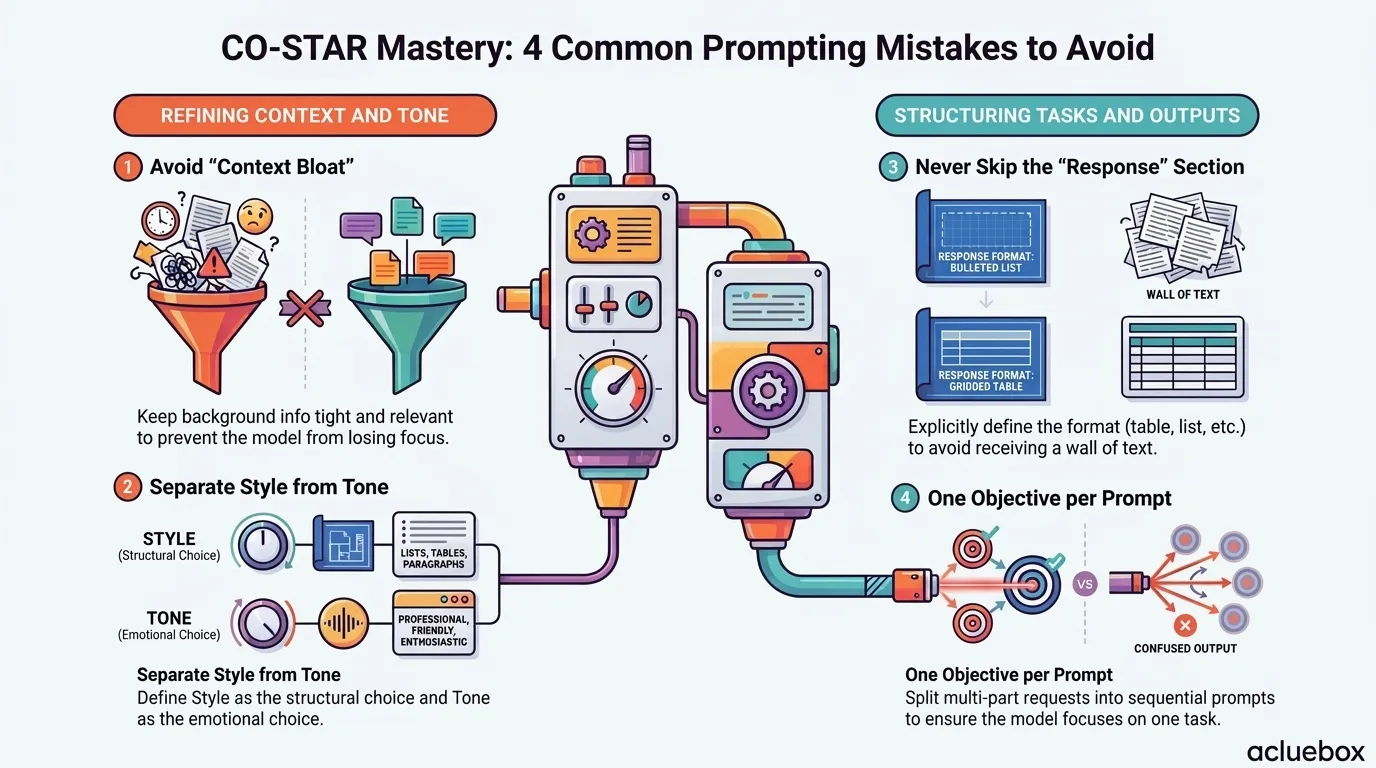
Overloading the Context section. Context should orient the model, not overwhelm it. If you paste in three paragraphs of unrelated background, the model may lose focus on what actually matters. Keep Context tight and relevant to the task at hand.
Confusing Style and Tone. As mentioned earlier, these two categories often get merged into one vague instruction like "professional and friendly". Try to separate the structural choice (Style) from the emotional choice (Tone) so the model can address both independently.
Skipping the Response section. This is the most commonly skipped part of CO-STAR, and it's also the one that causes the most rework. Without a defined Response format, you'll often get a wall of text when you needed a table, or a short list when you needed a full paragraph.
Writing objectives that try to do too much. "Write a blog post, then summarize it into a tweet thread, then draft three subject lines" is really three tasks stuffed into one Objective. Split multi-part requests into sequential prompts, or clearly number and prioritize them if you must combine them.
CO-STAR works well for single, well-defined tasks. For multi-step workflows involving several tools, files, or decision points, you may need a broader approach sometimes called context engineering, which manages information across an entire process rather than a single prompt.
No prompt framework fits every scenario. CO-STAR adds significant structure—which is an enormous advantage for nuanced, high-stakes tasks, but pure overhead for quick queries.
The Two-Turn Rule: If you find yourself typing a follow-up prompt to fix the format ("make it a bulleted list") and another to fix the voice ("make it sound less robotic"), stop. That multi-turn friction is the clearest signal that the task warranted a CO-STAR brief from the start.
The CO-STAR framework isn't magic, and it won't turn a weak idea into a great one. What it does is remove the friction between what's in your head and what ends up on the page. By explicitly stating your Context, Objective, Style, Tone, Audience, and Response format, you give the model everything it needs to produce something close to your first draft rather than a rough guess you'll need to heavily edit.
Start small. Pick one recurring task you handle regularly, whether that's writing customer replies, drafting reports, or generating social captions, and rebuild your usual prompt using the CO-STAR template above. Compare the output to what you were getting before. Most people notice the difference immediately, and from there, CO-STAR tends to become a permanent part of how they work with AI.
1. Is CO-STAR only useful for ChatGPT, or does it work with other AI models too?
CO-STAR works with any large language model, including Claude, Gemini, and open-source models like Llama. The structure is model-agnostic because it's about how you organize information, not a feature specific to one platform.
2. Do I need to include all six sections every time?
Not necessarily. For simple tasks, you can skip sections that don't apply, such as Tone for a purely technical output. For complex or client-facing work, filling in all six tends to produce noticeably better results.
3. Can I use CO-STAR for coding prompts?
Yes, absolutely. While CO-STAR was originally popularized for creative and business writing, it adapts exceptionally well to technical tasks when you translate the dimensions: use Context for your tech stack and repo constraints, Style for architectural patterns and typing standards, and Response for strict code block formats. Storing these components as reusable snippets makes it one of the most reliable ways to generate clean, production-ready code.
4. How long should each CO-STAR section be?
There's no fixed rule, but shorter is usually better. Context might be two to four sentences, while Objective should ideally be a single clear sentence. Overly long sections can dilute the model's focus.
5. What's the easiest way to start using CO-STAR?
Copy the prompt template from this guide, save it to Acluebox, and fill it in for your next AI request instead of typing a casual one-liner. Repetition is what makes the framework stick.

How to Create Your Own Brand Voice (With Prompt & Examples)

Build Reusable Prompts: 10 Variables

How to Create Consistent Brand Voice Using AI Prompts on Social Media

The Ultimate Brand Voice Prompt Template for Social Media Copywriting

AI Prompts for Creating Scroll-Stopping Social Media Captions