AI for Advertising Workflows: How to Streamline from Brief to Creative
A 10-step framework help ad agencies move from brief to creative faster while cutting revisions and manual busywork.
A 10-step framework help ad agencies move from brief to creative faster while cutting revisions and manual busywork.
Advertising agencies don't lose money on bad ideas but on a lack of execution.
That's why AI is starting to close those gaps, turning a chain of manual steps into a workflow that moves on its own.
This guide breaks down what an advertising workflow actually looks like, why the agency version of it matters more than most teams realize, and how AI fits into each stage from the first client brief to the final creative asset.
An advertising workflow is the defined sequence of steps a piece of marketing content moves through, from the initial idea to the moment it goes live in front of an audience. It covers research, strategy, creative production, internal review, client approval, and distribution.
At its simplest, a workflow answers three questions for everyone involved: what happens next, who owns it, and what "done" looks like. Without that clarity, work stalls in the gaps between people rather than in the work itself.
A workflow is not the same as a project plan. A project plan is specific to one campaign or deliverable. A workflow is the repeatable structure that every similar project follows, which is why getting it right once pays off across dozens of future projects.
An advertising agency workflow is the same concept applied at the scale of a full-service or specialized agency, where multiple clients, multiple teams, and multiple deliverable types are moving through the pipeline at once.
Where a single brand's internal marketing team might run one or two workflows in parallel, an agency workflow has to account for:
Because agencies bill for time and outcomes, an inefficient workflow doesn't just slow down delivery. It directly erodes margin. That's part of why agency leaders treat workflow design as a growth lever rather than an operational afterthought.
A workflow only works if it's documented somewhere every team member can find it. If your "process" lives in one project manager's head, it isn't a workflow yet, it's a habit that disappears the moment that person is out sick or leaves.
Growth in an agency usually means one of two things: more clients at the same team size, or the same clients with more scope. Both depend on the same thing: the ability to produce quality creative work without a proportional increase in hours spent coordinating that work.
A tight workflow gives an agency three specific growth advantages.
Predictable delivery. When every campaign follows the same sequence of steps, timeline estimates become far more reliable. That reliability is what lets an account manager confidently promise a client a launch date without padding it with a two-week buffer "just in case."
Lower cost per deliverable. Every hour spent chasing down a missing asset, clarifying a vague brief, or redoing work because feedback got lost is an hour that isn't billable in a useful way. Tightening the workflow directly reduces that overhead, which improves margin on every project, not just the big ones.
Capacity for scale. A documented, repeatable workflow can absorb new hires, new clients, and new tools without breaking. An ad hoc process, by contrast, tends to break exactly when an agency needs it most: during a growth spurt.
AI accelerates all three of these by removing the manual, repetitive parts of the workflow: transcribing brief calls, drafting first-pass copy, tagging assets, summarizing feedback threads, and flagging where a project has stalled.
Here is a practical, end-to-end workflow that most agencies can adapt regardless of size or specialty. Each step notes where AI tools typically add the most value and where human oversight remains essential.
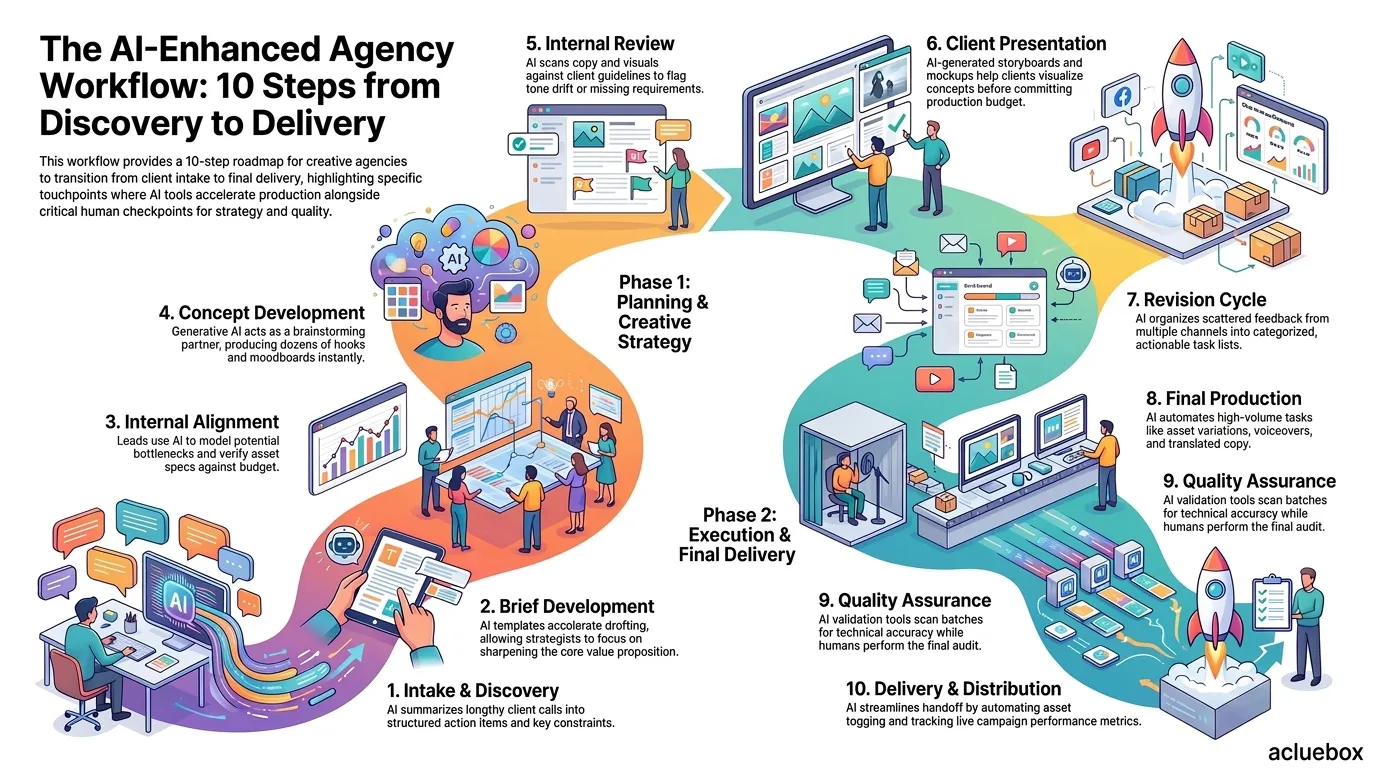
The intake phase sets the foundation for the campaign. The account team and strategists meet with the client to uncover goals, audience profiles, budgets, and launch timelines. Historically, this meant multiple team members scribbling fragmented notes, risking lost details or forgotten requirements.
AI speeds up discovery by processing raw information instantly. Transcription and summarization tools turn a forty five minute call into a structured summary with key constraints and action items. Account managers get a clear overview without relistening to lengthy recordings.
Strategists convert raw discovery notes into an actionable creative brief. A strong brief clarifies the business challenge, the primary audience, the core promise, and the brand tone. Clear direction at this stage prevents costly misunderstandings later.
AI prompt templates accelerate brief drafting by structuring initial notes into standard sections. Strategists can then skip manual formatting and focus their time on sharpening strategic insights and refining the core value proposition.
Project leads across account management, strategy, creative, and media review the brief together before work starts. This checkpoint ensures the scope matches the contracted budget and deadlines remain realistic.
AI tools assist alignment by modeling potential bottlenecks and checking asset specs against channel standards. This keeps internal meetings brief and focused on solving practical challenges.
With the brief approved, creatives begin ideation. Writers, art directors, and designers explore distinct angles, visual styles, and storytelling hooks to solve the creative problem.
Generative AI acts as a fast brainstorming partner. Models generate dozens of headline hooks, angles, and rough moodboards in minutes. Creatives can quickly discard generic options and polish the most promising directions.
The Creative Director and Account Lead review all concepts before client presentation. They verify that the creative answers the brief, follows brand rules, and fits within production budgets.
AI simplifies review by running compliance checks. Language models quickly scan copy and visual drafts against client guidelines to flag tone drift, forbidden terms, or missing mandatory elements.
The agency presents selected concept directions to the client, explaining the strategic reasoning behind each option. Presenting two or three distinct routes gives the client clear choice without overwhelming them.
AI tools assist pitch preparation by polishing presentation decks and drafting scripts. Generated storyboard sketches and mockups help clients visualize concepts in real formats before committing budget.
Clients review concepts and return with edits. In traditional agencies, feedback often arrives scattered across emails and chat messages, creating confusion and scope creep.
AI tools organize this stage by summarizing feedback into categorized action items. By grouping copy edits and visual revisions into clear tasks, teams resolve client requests in fewer passes.
Approved concepts move into final production. Writers finalize copy, designers create visuals, video editors produce motion assets, and developers build landing pages.
AI tools provide leverage by generating asset variations across different aspect ratios, voiceovers, and translated copy. Automating routine formatting lets production teams deliver large volumes without burnout.
Every deliverable undergoes quality checks before release. Reviewers verify dimensions, compression, accessibility, copy accuracy, and legal disclaimers.
AI validation tools scan batches of assets to confirm resolution, contrast ratios, and text accuracy in seconds. Human reviewers perform the final audit to ensure complete precision.
The final step launches the approved assets. Teams package deliverables for client handoff or upload them directly to digital ad platforms with proper tracking parameters.
AI tools streamline distribution by generating standard filenames, applying asset tags, and organizing media plans. Automated dashboards then track live campaign metrics to highlight creative fatigue early.
Map this workflow visually, even as a simple flowchart, and post it somewhere the whole team can reference it. Teams that can see the workflow tend to follow it more consistently than teams that only hear about it once during onboarding.
A structured workflow pays off in ways that go beyond simply "getting organized." Here's what agencies actually gain.
If you're not sure where your workflow is actually breaking down, ask your team to flag the single step in the last project that felt the most frustrating. Patterns usually show up after two or three projects, not one.
One of the highest-leverage places to apply AI in an advertising workflow is turning discovery notes into a polished creative brief. A consistent prompt template makes this repeatable across every account manager on the team.
You are a senior advertising strategist. Turn the following discovery notes into a structured creative brief.

Client: {{client_name}}
Campaign objective: {{campaign_objective}}
Target audience: {{target_audience}}
Key message: {{key_message}}
Budget: {{budget}}
Timeline: {{timeline}}
Channels: {{channels}}
Mandatory brand elements: {{brand_guidelines}}

Format the output with these sections: Background, Objective, Audience Insight, Key Message, Tone and Voice, Deliverables, Channels, Timeline, Success Metrics.
You are a senior advertising strategist. Turn the following discovery notes into a structured creative brief.

Client: Northfield Outdoor Gear
Campaign objective: Drive online sales during the fall hiking season
Target audience: Active adults aged 28-45 who hike regularly and shop online
Key message: Northfield gear is built for real trail conditions, not just the studio
Budget: $45,000
Timeline: 6 weeks, launching October 1
Channels: Instagram, YouTube pre-roll, email
Mandatory brand elements: Use the updated 2026 logo lockup, avoid stock hiking photography

Format the output with these sections: Background, Objective, Audience Insight, Key Message, Tone and Voice, Deliverables, Channels, Timeline, Success Metrics.
Social media agency, weekly content cycle. A social-first agency runs a five-day loop: Monday brief review, Tuesday concept drafts using AI-generated caption variations, Wednesday internal review, Thursday client approval, Friday scheduling and QA. AI handles first-pass caption drafting and hashtag research, while humans control tone and final approval.
Full-service agency, quarterly campaign launch. A larger agency running a full brand campaign uses the 10-step workflow above almost exactly, with AI tools supporting transcription during discovery, concept variation generation, and automated tagging of final assets for the media buying team.
Freelance collective, project-based work. A small collective of freelancers coordinating on a single client project uses a lighter version of the workflow, skipping formal internal review in favor of a single shared feedback document, but keeping the brief-first, QA-before-delivery structure intact.
Across all three, the constant is that the workflow exists independently of any one person's memory or habits, which is what allows the agency to take on new work without renegotiating the process from scratch.
Spreadsheets are where most agency workflows start, and where a lot of them eventually break. A shared spreadsheet works fine for tracking five projects. It becomes a liability at fifty, when version conflicts, missing updates, and manual status changes start eating into the very time the workflow was supposed to save.
Purpose-built workflow software solves the problems spreadsheets can't:
| Capability | Spreadsheet | Workflow Software |
|---|---|---|
| Real-time status visibility | Manual updates, easily outdated | Automatic status tracking |
| Client feedback capture | Scattered across email/chat | Centralized comment threads |
| Brief-to-task automation | None | Auto-generates tasks from brief templates |
| AI-assisted drafting | None | Built-in or integrated AI copy/asset generation |
| Version control on creative assets | Manual file naming | Built-in version history |
| Reporting and bottleneck detection | Manual analysis | Automated dashboards |
Switching tools doesn't fix a broken workflow by itself. Map the process first, then choose software that supports the steps you've already defined, not the other way around.
The agencies getting the most out of AI right now aren't the ones chasing every new tool. They're the ones that fixed their workflow structure first, documented it, and then layered AI into the specific steps, brief writing, concept generation, feedback summarization, that were previously the slowest parts of the process. That order matters. AI speeds up a good workflow. It just adds noise to a broken one.
An advertising workflow is the repeatable structure every similar project follows, covering brief, production, review, and delivery. A project plan is the specific schedule and task list for one campaign, built using that underlying workflow.
AI tends to add the most value in the highest-friction, most repetitive steps: turning discovery calls into structured briefs, generating first-pass concept or copy variations, summarizing scattered client feedback, and tagging or organizing final assets.
Most agencies build in two to three formal revision rounds per deliverable. Fewer than that risks rushing quality checks, while more than that usually signals a brief or feedback problem rather than a creative one.
A spreadsheet can work for a handful of concurrent projects. Once an agency is juggling multiple clients and team members at once, workflow software becomes worth the switch because it centralizes feedback, tracks status automatically, and reduces the manual coordination spreadsheets require.
A quarterly review is a reasonable default. Growth events, like adding new clients, new services, or new hires, are also good triggers to revisit whether the current workflow still fits how the team actually works.